Live queries
A live query answers itself: hand it the query you would run once, and you get the rows now and the rows again every time the database changes. This page is for React developers who have run a query and want the screen to stay current.
In React
Section titled “In React”Reef’s board is one live query — a query that re-runs itself whenever the database changes and hands your screen new rows (glossary):
  const db = useDb(slug, Reef);
  const board = useLive(db, boardQuery);  const people = useLive(db, peopleQuery);  const labels = useLive(db, labelsQuery);
useLive(db, query) returns { rows, error, ticks }. rows is undefined until the first answer; error is set only when the query can never succeed (bad request, a wrong database name, no permission, memory limit); ticks counts updates (glossary) — each time the server tells this page that a newer version number exists (glossary). Render with key={row.id}.
See it
Section titled “See it”Open the same workspace in two windows and drag a card. The other window moves it within about a second, locally and deployed, and Reef’s header pill pulses on every update (key={ticks} re-triggers the animation):
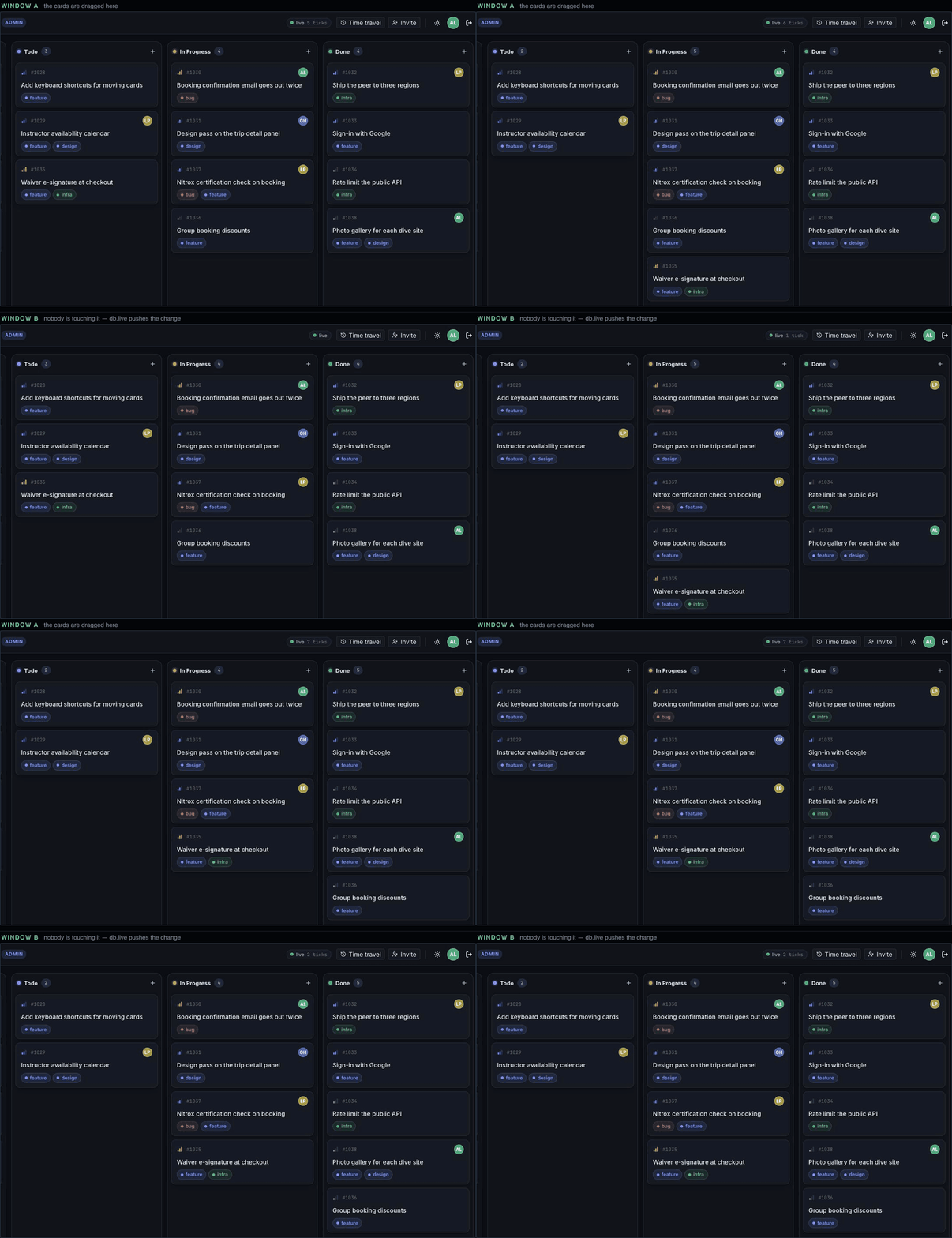
src/app/screens/BoardScreen.tsx:264-267 There is no refetch code anywhere in Reef. Nothing at the write site announces the change, and there is no cache to invalidate.
What re-runs, and when
Section titled “What re-runs, and when”- After your own write — including in the window that wrote.
- After anyone else’s write. Other windows hear about the new version over their WebSocket connection (glossary) and re-run within about a second, locally and deployed. Writes always go over HTTPS; reads and updates share that connection.
- A re-run is a whole re-run. No diffing: the query is evaluated again, permissions and limits applied exactly as for
db.q. - Only news is emitted. Identical results are not emitted again, so a write the query does not see is not a re-render.
- Dropped connections recover on their own — retries back off from 250 ms to 5 s and the connection reconnects in place.
- A pinned view emits once and completes.
useLive(db.asOf(t), query)has no news to deliver;rowsstays.
Live reads of one record
Section titled “Live reads of one record”usePull is the same idea for one record. Reef’s issue panel keeps one open on the selected issue; every emission — an edit from any window — resets the drafts:
const extra = usePull(db, { id: issueId }, issueExtraShape).rows ?? null;{ id: issueId } inline is fine — the subject is compared by value, not by identity.
Where live queries work
Section titled “Where live queries work”A live query needs a WebSocket connection — that is how the server tells the page the database moved.
| environment | live queries |
|---|---|
a browser, through Ramose.connect (or RamoseProvider) | yes — this is the intended home |
a Worker calling the server through Ramose.ServerBinding | no — no WebSocket on that hop; db.live fails outright. See Live queries need a browser |
| Node or Bun | only where a global WebSocket exists, or one you pass to Ramose.connect |
Outside React
Section titled “Outside React”db.live(query) returns a stream of results, not a single value, so Effect.runPromise cannot run it — that rule is for one-shot calls like db.q. Consume it with Stream.runForEach:
import * as Effect from "effect/Effect";import * as Stream from "effect/Stream";
await Effect.runPromise(  Stream.runForEach(db.live(todoQuery), (rows) =>    Effect.sync(() => console.log(rows)),  ),);
That call runs until you interrupt it, re-emitting the whole result set on every update. In React, useLive does this for you.
What it costs
Section titled “What it costs”There is no per-query subscription state on the server. A live query is a re-run of the same read path, triggered by a version update. Bursts of small writes coalesce, because re-runs happen per update rather than per write.
Hoist your queries
Section titled “Hoist your queries”useLive re-subscribes when the query value changes, so build queries at module scope, as queries.ts does. Changing values are Ramose.params — bind them as the third argument; an inline { issueId } is fine, and a params-only change does not blank rows:
const comments = useLive(db, commentsQuery, { issueId });db.asOf(t) inline is fine — views compare by value. Effect users who build a stream themselves can pass it directly (useLive(stream)) — see React hooks.