One database per customer
A database is a name. Naming it creates it. This page is for anyone who wants each customer or team in its own database, from the browser (Reef) or from a Worker.
Name it, install it
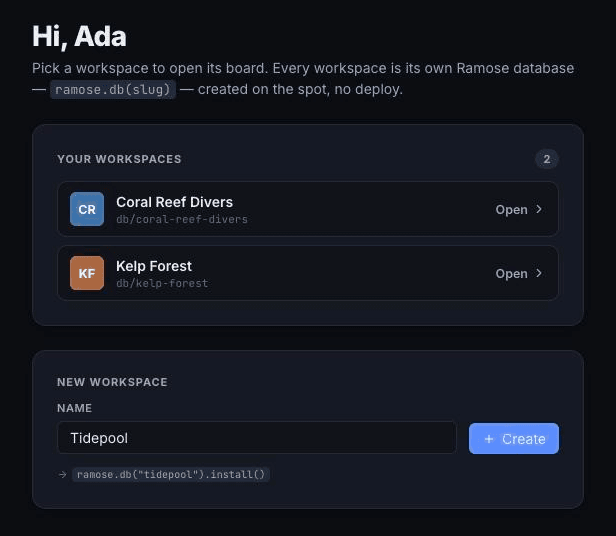
Section titled “Name it, install it”A workspace is one customer’s isolated data, one database (glossary). In Reef you make one by typing a name and clicking Create: the name becomes a slug, and the slug becomes the database.
src/app/screens/WorkspacesScreen.tsx:381-389 Ramose is built on Effect. In React you rarely see it — the hooks run it for you; inside db.transact you write yield*. (Effect in five minutes)
const token = Ramose.token.jwt(() => authClient.ramose.token({ db: slug })); const cls = ((await token.claims()).ramose?.class ?? "viewer") as RamoseClass; const ramose = Ramose.connect({ url: RAMOSE_URL, token }); try { const db = ramose.db(slug, Reef); if (provision) await Effect.runPromise(provisionWorkspace(db, user));ramose.db(slug, Reef) is a pure call: no network, no create step. The first write makes the database real, and Reef’s first write installs the schema — writes it in as an ordinary write (glossary) — then seeds labels and your own user record:
export const provisionWorkspace = ( db: ReefDb, me: { id: string; name: string; email: string },) => Effect.gen(function* () { yield* db.install(); yield* db.transact(function* (tx) { const user = yield* tx.entity(); yield* user.add(User.sub, me.id); yield* user.add(User.name, me.name); yield* user.add(User.email, me.email); // … }); });db.install() is safe to run twice: an unchanged schema costs one empty write.
What that buys you
Section titled “What that buys you”- No fleet to manage. One deployed server serves every name — one thing to deploy, not one per customer.
- Isolation by construction. Every name gets its own prefix in storage and its own writer, the one thing per database that commits writes, in order (glossary). Nothing done to one database touches another.
What counts as a name
Section titled “What counts as a name”Letters, digits, ., _, -; up to 64 characters; starting with a letter or digit. Ramose.isDatabaseName(name) (and Ramose.DATABASE_NAME_RE) lets a “create workspace” form check first; a bad name fails the first call with InvalidRequest and never leaves the browser. Reef adds a stricter slug rule on top (examples/reef/src/domain/shared.ts:57-60).
Two doors to install the schema
Section titled “Two doors to install the schema”Something must install the schema before the first real read or write.
At deploy — for databases you know by name. The todos app declares one:
export const TodosDb = Ramose.Database("todos", { server: Server, catalog: Todos });At creation — for names that appear at run time. Reef calls db.install() from the browser under the creator’s admin token; a Worker does the same at sign-up.
Ramose.Database for the databases your app always has; db.install() when users create them. Never per request.
One token per workspace
Section titled “One token per workspace”Under a policy, a sign-in token names one database in its ramose.db claim. A token for coral-reef-divers cannot open kelp-forest; the answer is Unauthorized. Opening another workspace means another token, so Reef gives RamoseProvider a key={slug} and the client is rebuilt (examples/reef/src/app/App.tsx:144-158). See Sign in and roles.
From a Worker
Section titled “From a Worker”Your own Worker holds a typed client and does the same at sign-up:
/** `PUT /t/:tenant` — the one place a tenant's catalog lands. One tx. */ const createTenant = (tenantId: string) => Effect.gen(function* () { const report = yield* ramose.db(tenantId, Movies).install(); return yield* HttpServerResponse.json({ tenant: tenantId, t: report.t }); });Every later request is ramose.db(tenantId, Movies) again, pure, per request. How the Worker gets ramose: Use it from a Worker.
The one limit
Section titled “The one limit”One database has one writer: writes land in order, one version number t each (glossary). In our benchmark (bench/RESULTS.md in the repo) one database sustained a few hundred writes per second on Cloudflare — 166–879 per second depending on client count. Past that you split across databases: a function call, not a deployment. There are no queries across databases; that is the price of the split.